Wie Sie Ihrem Team Rollen zuweisen
Standardmäßig hat der/die Direktor/in alle Rechte zur Schulverwaltung im Bildungsportal. Er/sie kann jedoch Rollen an Teams delegieren, sodass ein Team für die Nachrichtenverwaltung, eines für das Hochladen der Personenfotos, usw. zuständig ist.
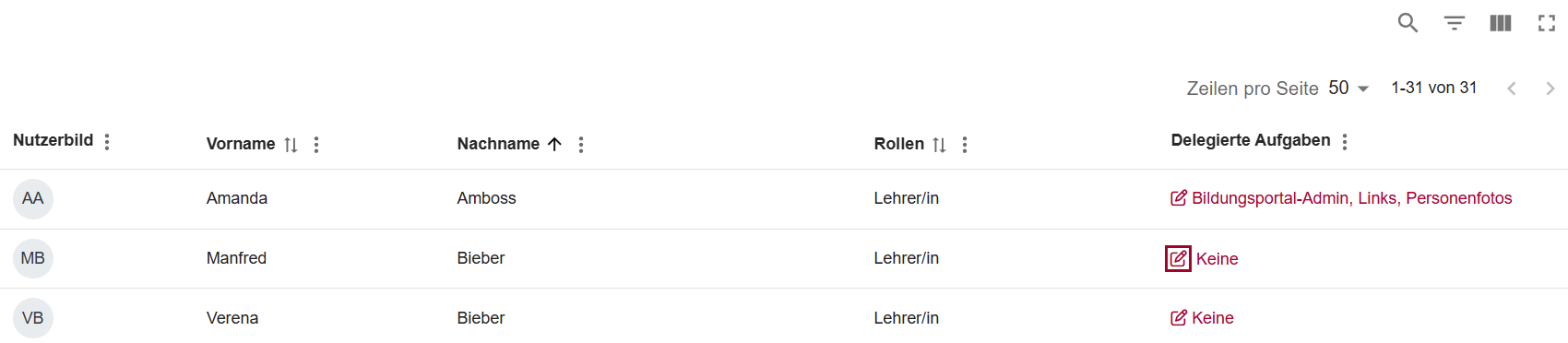
Um eine Rolle zu delegieren, öffnen Sie im Widget Organisation am Dashboard die Option Delegierte Aufgaben.

Eine Rolle zuweisen
Um einem User eine Rolle zuzuweisen, klicken Sie auf das Bearbeiten-Icon neben dem entsprechenden User. Sie können die Filter-Buttons über der Tabelle oder die Suchfunktion rechts oben verwenden, um Benutzer/innen basierend auf deren Vor- oder Nachnamen zu finden.
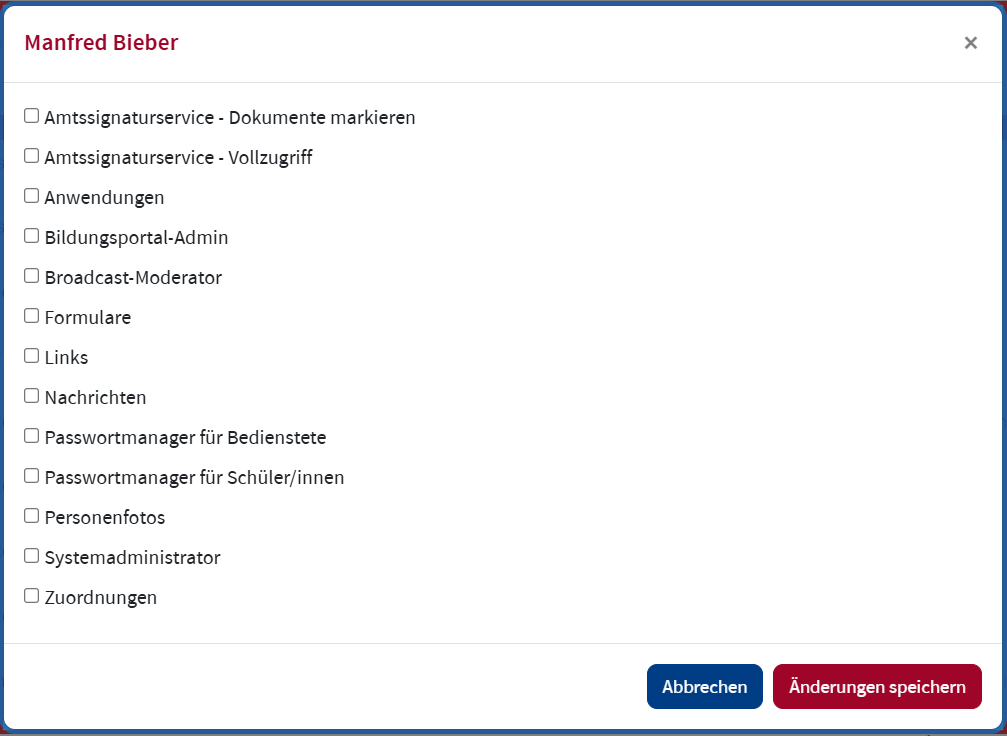
Aktivieren Sie die Checkboxen jener Rolle, die Sie der ausgewählten Person zuweisen möchten. Klicken Sie dann rechts unten auf Änderungen speichern.
Die Bildungsportal-Admin Rolle verfügt über die gleichen Rechte im Bildungsportal wie die Schulleitung, mit Ausnahme der Delegation der Bildungsportal-Admin Rolle.
- Amtssignaturservice - Dokumente markieren
- Direktorinnen und Direktoren sowie berechtigte Bedienstete können alle markierten Dokumente der Organisation anzeigen, Markierungen und Kommentare zu Dokumenten hinzufügen.
- Amtssignaturservice - Vollzugriff
- Direktorinnen und Direktoren sowie berechtigte Bedienstete können die Amtssignatur an Dokumenten anbringen. Diese Rolle beinhaltet auch Amtssignaturservice - Dokumente markieren
- Anwendungen
Direktorinnen und Direktoren bzw. Bildungsportal-Admins können Anwendungen im Widget Anwendungen am Dashboard für einzelnen Nutzer/innen oder ganze Nutzergruppen (z. B. alle Schüler/innen, alle Lehrer/innen, etc.) freischalten. Damit wird der Single Sign On (SSO) der jeweiligen Anwendung im Bildungsportal für die Nutzer/innen verfügbar. Wenn die Anwendung auch Widgets zur Verfügung stellt, werden diese den Nutzer/innen auch am Dashboard angezeigt.
Bitte beachten Sie, dass einige Anwendungen auch zentral durch das BMB gesteuert werden.- Bildungsportal-Admin
- Die Bildungsportal-Admin Rolle verfügt über die gleichen Rechte im Bildungsportal wie die Schulleitung, mit Ausnahme der Delegation der Bildungsportal-Admin Rolle.
- Broadcast-Moderator
Das Feature Broadcast Nachrichten ermöglicht es Direktorinnen und Direktoren sowie autorisierten Bediensteten Nachrichten an Mitglieder der Organisation zu versenden. Es handelt sich dabei um einen Einweg-Kommunikationskanal, Antworten oder Diskussionen sind nicht vorgesehen. Es können auch Vorlagen für ein späteres schnelles versenden angelegt werden.
- Formulare
Im Feature Formulare können Direktorinnen und Direktoren sowie berechtigte Bedienstete Formulare hochladen und Links zu Online-Formularen bereitstellen. Abhängig von der Rolle im Bildungsportal können den Nutzerinnen und Nutzern unterschiedliche Formulare im Widget Formulare auf ihrem Dashboard zur Verfügung gestellt werden.
- Links
Direktorinnen und Direktoren sowie berechtigte Bedienstete können den Nutzerinnen und Nutzern der Organisation eine Liste mit Links zu Webseiten oder Webapplikationen zur Verfügung stellen. Diese Liste mit wichtigen Links wird am Dashbord der Nutzerinnen und Nutzer in einem eigenen Widget Wichtige Links angezeigt. Abhängig von der Rolle der Nutzerinnen und Nutezr können unterschiedliche Links angezeit werden, d. h. für Schüler/innen, Lehrer/innen, Erziehungsberechtigte und Schulleiter/innen.
- Nachrichten
- Direktorinnen und Direktoren sowie berechtigte Bedienstete können Neuigkeiten der Organisation verwalten.
- Passwortmanager für Bedienstete
- Direktorinnen und Direktoren sowie berechtigte Bedienstete können das ID Push Passwort für Bedienstete zurückseten.
- Passwortmanager für Schüler/innen
- Direktorinnen und Direktoren sowie berechtigte Bedienstete können das ID Push Passwort für Schülerinnen und Schüler zurückseten.
- Personenfotos
- Direktorinnen und Direktoren sowie berechtigte Bedienstete können Fotos hochladen, die im Nutzerlisten und im Profil der Nutzerinnen und Nutzer angezeigt werden.
- Systemadministrator
- Direktorinnen und Direktoren sowie berechtigte Bedienstete können ID Push konfigurieren.
- Zuordnungen
Mit der Funktion Zordnungen können Schulleitungen und autorisierte Bedienstete beliebigen Personen eine Rolle an der Organisation zuweisen, sofern diese nicht aus einem der dem Bildungsportal vorgelagerten Systeme automatisch übernommen werden können. Bitte prüfen Sie vor der Verwendung dieser Funktion, ob die Person tatsächlich nicht automatisiert angelegt werden kann und keine Probleme bei der Datensynchronisation vorliegen. Im Zweifelsfall wenden Sie sich bitte vor der Verwendung dieser Funktion an Unser Supportteam für eine individuelle Abklärung.